Delete a blog
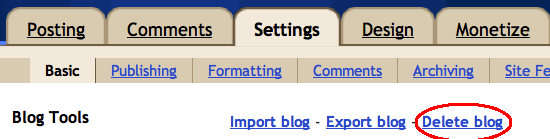
To delete your entire blog, just go to Settings | Basic. Make absolutely sure that you are on the right blog and that you want to permanently remove it from your account. Then click Delete Blog and confirm by clicking OK.
 If you're using our upgraded user interface, click on the drop-down menu next to the gray Post List icon, go to Settings | Basic, and click on the "Other" section for the option to delete your blog.
If you've accidentally deleted your blog and want it back, you can restore your blog within a certain period of time after deletion. Let's say you have 5 blogs, and you've deleted one of them. Just go to your Dashboard, where your blogs are listed, and find the line at the bottom that says "Displaying 4 of 5 blogs - Show all." Click "Show all," and your deleted blog will appear in the list, with the option "Undelete this blog." Once you select that option, everything will be back to normal.
 If you're using our upgraded user interface, click on the drop-down menu next to the gray Post List icon, go to Settings | Basic, and click on the "Other" section for the option to delete your blog.
If you've accidentally deleted your blog and want it back, you can restore your blog within a certain period of time after deletion. Let's say you have 5 blogs, and you've deleted one of them. Just go to your Dashboard, where your blogs are listed, and find the line at the bottom that says "Displaying 4 of 5 blogs - Show all." Click "Show all," and your deleted blog will appear in the list, with the option "Undelete this blog." Once you select that option, everything will be back to normal.
